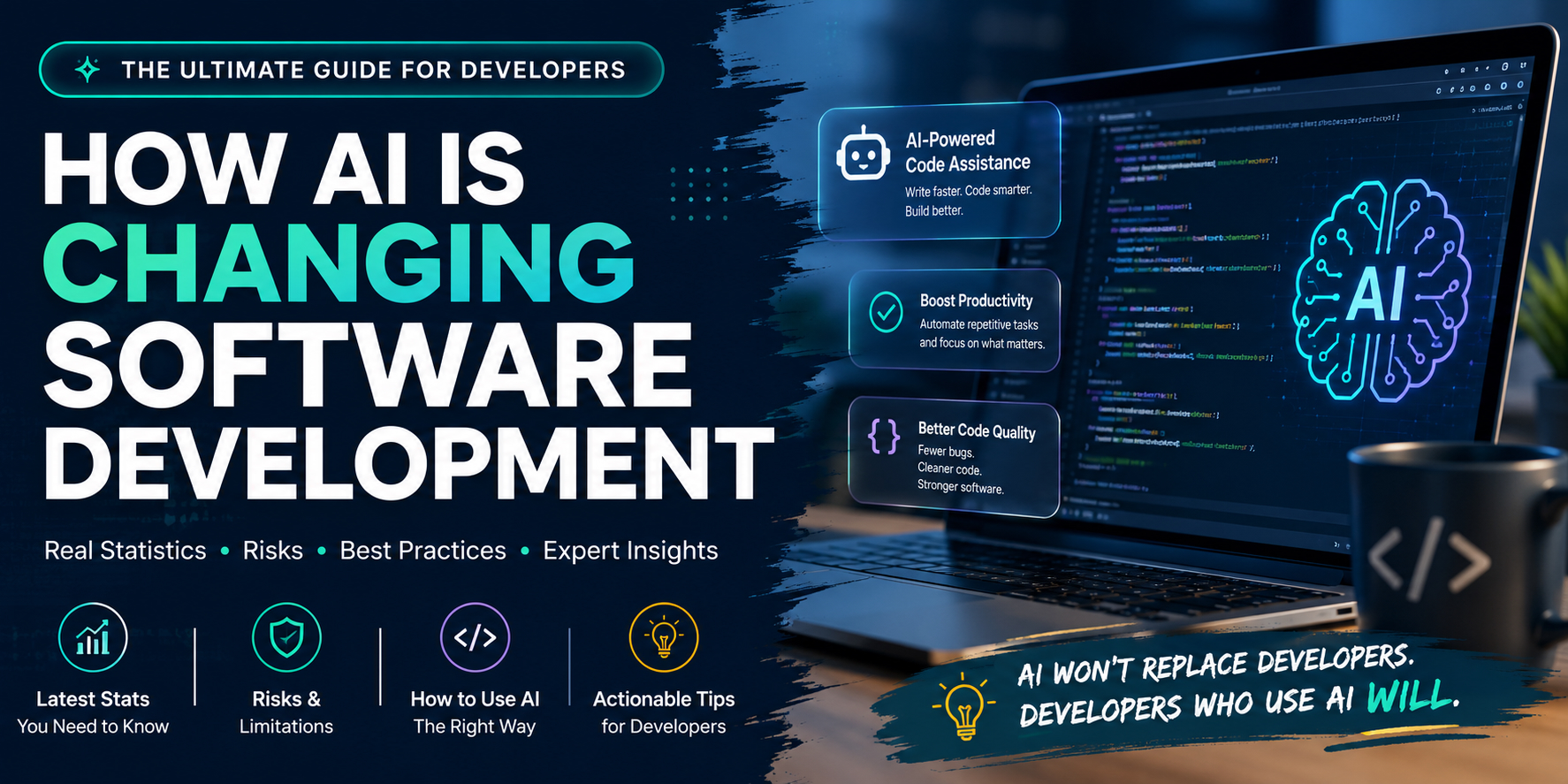
How AI Is Raising the Bar for Software Developers
Artificial intelligence has created a lot of anxiety about the future of software development. I understand why. If you are a developer, an engineering manager, a software architect, a product leader, or an executive responsible for technology, it is hard not to wonder what happens next.
Will AI make software developers less valuable? Will it take jobs away? Will it make engineering teams smaller? Will it turn software development into something that feels less creative, less technical, or less human?
Those are fair questions. Every major technology shift creates uncertainty, and this one is moving especially fast. But I think the better question is not whether AI is a threat to software developers. The better question is whether developers are willing to use AI as leverage.
For developers who embrace AI with curiosity, discipline, and good judgment, there has probably never been a better time to build software.
That does not mean AI is magic. It does not mean every developer suddenly becomes 10 times more productive. It does not mean weak requirements become strong products. It does not mean fragile architecture becomes reliable infrastructure. It does not remove the need for testing, security, code review, design judgment, or human ownership.
But AI is changing what a capable developer can accomplish. It is changing how quickly ideas can become prototypes. It is changing how fast teams can explore options. It is changing how much leverage one thoughtful engineer can have.
And that is exciting.
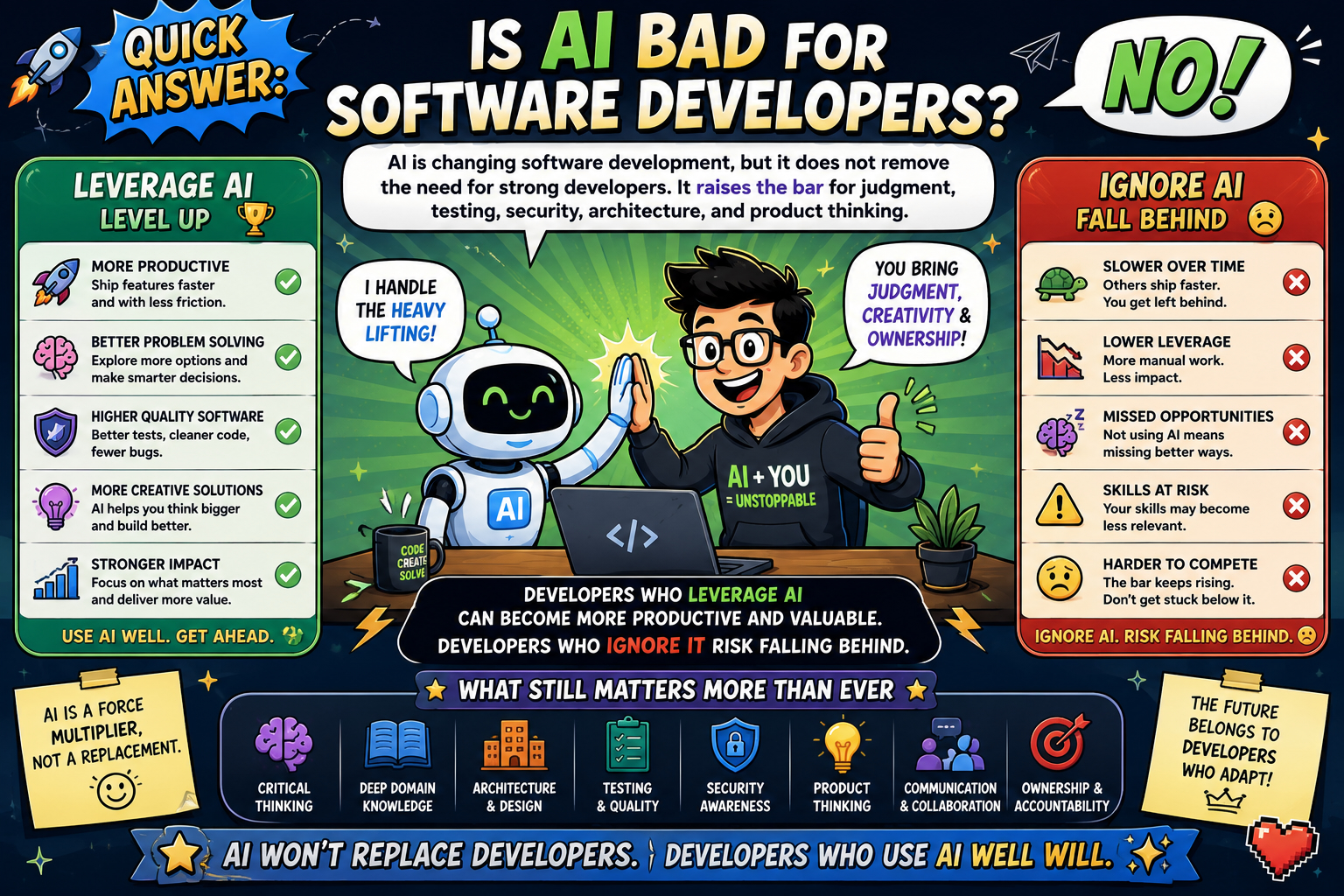
Quick Answer: Is AI Bad for Software Developers?
No, AI is not bad for software developers who learn to use it well. AI is changing software development, but it does not remove the need for strong developers. It raises the bar for judgment, testing, security, architecture, and product thinking. Developers who leverage AI can become more productive and valuable. Developers who ignore it risk falling behind.
Key Takeaways
- AI is changing software development, but it does not eliminate the need for skilled developers. The strongest developers are still needed for judgment, architecture, security, testing, product understanding, communication, and ownership.
- AI coding tools are already being used at enterprise scale. Companies such as Anthropic, Google, Amazon, Airbnb, Microsoft, Mercado Libre, Coinbase, Uber, Saxo Bank, Bancolombia, and others have reported meaningful AI assisted development activity.
- AI can improve developer productivity, but results depend on context. Some studies and company examples show major gains, while others show that AI can slow developers down in complex, familiar, high context codebases.
- AI generated code still needs review. Developers should treat AI generated code as untrusted until it has been read, tested, secured, and understood.
- The biggest opportunity is not more code. The real opportunity is better software, faster learning, more effective modernization, clearer communication, and higher leverage for strong engineering teams.
- This may be one of the best times in history to be a software developer, but only for developers who adapt. AI raises the bar, but it also raises the ceiling.
Is AI a Threat to Software Developers or a Productivity Multiplier?
The developers who thrive in the AI era will not be the ones who pretend AI does not matter. They will be the ones who learn to direct it, question it, verify it, and use it to raise the quality and speed of their work.
The core shift is not that AI replaces software engineering skill. The core shift is that AI rewards software engineering skill.
A developer who understands systems, requirements, testing, user value, security, and architecture can use AI to move faster through repetitive work, explore more options, understand unfamiliar code, generate test cases, write documentation, and prototype ideas that might previously have taken days or weeks.
A developer who lacks judgment can also use AI to produce a lot of bad code very quickly. That distinction matters.
The future of software development is not simply about who can type code faster. It is about who can understand problems, guide AI tools, verify results, make sound tradeoffs, and deliver reliable software that creates real value.
That is still deeply human work.
What Does the Research Say About AI and Developer Productivity?
The productivity evidence is becoming harder to ignore. In Microsoft Research and GitHub Copilot, “The Impact of AI on Developer Productivity: Evidence from GitHub Copilot“, developers with access to Copilot completed a coding task 55.8 percent faster than the control group.
McKinsey, “Unleashing Developer Productivity with Generative AI“, found that developers using generative AI tools could complete some common software development tasks up to twice as fast, with particularly strong gains in documentation, code generation, and refactoring.
Adoption is also moving quickly. Stack Overflow, “Developer Survey 2025: AI“, found that 84 percent of respondents are using or planning to use AI tools in their development process, and that 51 percent of professional developers use AI tools daily.
Those numbers do not prove that every developer becomes dramatically more productive overnight. They do show that AI assisted development is moving from curiosity to daily workflow. The bigger proof point, however, may not be survey data or controlled experiments. It may be what is already happening inside large technology companies, banks, ecommerce platforms, public sector teams, and startups.

How Are Enterprises Using AI to Write and Modernize Code?
AI assisted software development has moved from experimentation to enterprise scale. That matters because the strongest evidence is no longer limited to individual developers trying autocomplete tools. The stronger evidence now includes large companies using AI coding tools and AI coding agents for modernization, code generation, pull request acceleration, internal developer platforms, and production development workflows.
In Anthropic, “When AI Builds Itself“, the company says that, as of May 2026, more than 80 percent of the code merged into Anthropic’s own codebase was authored by Claude. Anthropic also says that the typical Anthropic engineer was merging 8 times as much code per day in the second quarter of 2026 as they were in 2024. The company is careful to note that lines of code are an imperfect measure, and that 8 times more code is almost certainly an overstatement of true productivity gain. Still, the direction is hard to miss.
Anthropic also reported a striking Stripe example in Anthropic, “Claude Fable 5 and Claude Mythos 5“. According to Anthropic, Stripe reported that Fable 5 compressed months of engineering into days. In a 50 million line Ruby codebase, the model performed a codebase wide migration in one day that would otherwise have taken a whole team more than two months by hand.
The Stripe example deserves careful wording. This is an Anthropic reported customer example, not a public Stripe engineering blog post that I can independently verify from Stripe itself. Still, it is a valuable enterprise scale proof point because it shows the direction of travel: AI coding agents are moving beyond autocomplete and into large scale codebase transformation.
Amazon reported another large scale modernization example in Amazon Web Services, “Amazon Q Developer Just Reached a 260 Million Dollar Milestone“. According to AWS, Amazon used Q Developer to migrate tens of thousands of production applications from Java 8 or 11 to Java 17. AWS said the effort saved more than 4,500 developer years of work compared with manual upgrades and generated 260 million dollars in annual cost savings from performance improvements.
Google has also shared substantial AI coding adoption numbers. In Google, “Google Cloud Next 2026: Sundar Pichai Remarks“, Google said that 75 percent of all new code at Google is now AI generated and approved by engineers, up from 50 percent the previous fall. In Alphabet, “Alphabet Earnings Q3 2024 CEO Remarks“, Google had already reported that more than a quarter of all new code was generated by AI and then reviewed and accepted by engineers.
Airbnb said in Airbnb, “Airbnb Q1 2026 Financial Results” that nearly 60 percent of the code its engineers produced was coauthored or written with AI. TechCrunch also covered the claim in TechCrunch, “Airbnb Says AI Now Writes 60 Percent of Its New Code“. Airbnb connected that usage directly to shipping faster, iterating more quickly, and delivering more improvements to guests and hosts.
Microsoft CEO Satya Nadella said at Meta’s LlamaCon that maybe 20 percent to 30 percent of the code inside Microsoft repositories is written by software, meaning AI, according to TechCrunch, “Microsoft CEO Says Up to 30 Percent of the Company’s Code Was Written by AI“.
Spotify shared on its fourth quarter earnings call that some of its best developers had not written a single line of code since December and were instead generating and supervising code. TechCrunch reported this in TechCrunch, “Spotify Says Its Best Developers Have Not Written a Line of Code Since December, Thanks to AI“, and Business Insider reported a similar account in Business Insider, “Spotify CEO Says Its Top Developers Have Not Written a Single Line of Code in 2026“. Spotify described an internal system called Honk, used with generative AI and Claude Code, to accelerate coding and product velocity.
Robinhood CEO Vlad Tenev said on the 20VC podcast, documented in 20VC, “Vlad Tenev“, that AI writes 50 percent of all net new code at Robinhood. He also said adoption inside the engineering team is close to 100 percent. The same interview is listed in Spotify, “Vlad Tenev 20VC Episode”, and Business Insider covered the claim in Business Insider, “Robinhood CEO Says the Majority of the Company’s New Code Is Written by AI“.
Coinbase has also made AI generated code a formal developer productivity signal. In Coinbase, “Tools for Developer Productivity at Coinbase“, Coinbase said it tracks the percentage of AI generated lines of code relative to human generated code, and that the trend was clear: AI was on track to eclipse human generated code at Coinbase by the end of the year. The company also pointed to examples where single engineers refactored, upgraded, or built new codebases in days instead of months. Coinbase CEO Brian Armstrong later said on X in Brian Armstrong, “AI Generated Code at Coinbase” that about 40 percent of daily code written at Coinbase was AI generated, and that he wanted to get it above 50 percent by October, while emphasizing that the code still needed to be reviewed.
Uber reported a more conservative but still important enterprise example in Uber, “Q1 2026 Prepared Remarks“. Uber said it had meaningfully improved developer velocity, with more than 10 percent of production ready code now driven autonomously by AI coding agents.
Mercado Libre, based in Argentina and operating across Latin America, is another important international example. In GitHub, “Mercado Libre Frees Developers’ Minds to Focus on Their Mission with GitHub“, GitHub says Mercado Libre has more than 9,000 developers using GitHub Copilot, saw a roughly 50 percent reduction in time spent writing code, and merges about 100,000 pull requests per day. This is a strong example because it shows AI coding adoption at massive scale outside the usual Silicon Valley narrative.
OpenAI also published a Mercado Libre case study, OpenAI, “Mercado Libre Introduces Verdi, an AI Developer Platform Powered by GPT 4o“. OpenAI describes Verdi as Mercado Libre’s internal AI developer platform and says it drove productivity and efficiency gains while saving millions.
Saxo Bank, based in Denmark, is another useful international example. Microsoft, “GitHub Copilot Accelerates Coding at Saxo Bank“, says Saxo Bank integrated Microsoft 365 Copilot and GitHub Copilot as part of an AI first culture to boost efficiency, improve the client experience, and support a growing base of traders and investors. Microsoft also reported in Microsoft, “AI Powered Success with More Than 1000 Stories of Customer Transformation and Innovation” that Saxo Bank’s 700 developers accelerated their coding rate by around 30 percent and use AI written code in almost every new application.
Bancolombia is a strong Latin American banking example. In Microsoft, “AI Powered Success with More Than 1000 Stories of Customer Transformation and Innovation“, Microsoft says Bancolombia is using GitHub Copilot to enhance its technical team’s productivity, resulting in a 30 percent increase in code generation. Microsoft also says this has led to an average of 18,000 automated application changes per year and 42 productive daily deployments.
GitHub and Accenture studied Copilot in a real enterprise environment. In GitHub, “Quantifying GitHub Copilot’s Impact in the Enterprise with Accenture“, GitHub reported that developers accepted around 30 percent of Copilot’s suggestions, that 90 percent of developers said they committed code suggested by Copilot, and that 91 percent said their teams merged pull requests containing Copilot suggested code. GitHub also reported that developers retained 88 percent of Copilot generated characters in their editor.
ZoomInfo published one of the more detailed enterprise deployment studies. In ZoomInfo Engineering, “Experience with GitHub Copilot for Developer Productivity at ZoomInfo“, and in the related arXiv version, “Experience with GitHub Copilot for Developer Productivity at ZoomInfo“, ZoomInfo reported an average acceptance rate of 33 percent for Copilot suggestions, 20 percent for lines of code, and a 72 percent developer satisfaction score across more than 400 developers. This is not as dramatic as the biggest headline numbers, but it is valuable because it reflects a real enterprise rollout with measured adoption and feedback.
NAV IT in Norway offers a useful public sector example. The study arXiv, “Developer Productivity With and Without GitHub Copilot: A Longitudinal Mixed Methods Case Study” examined Copilot usage across 703 GitHub repositories and 26,317 unique non merge commits over two years. The study did not find statistically significant changes in commit based activity after Copilot adoption, even though users reported productivity improvements. This is an important international example because it adds balance: AI may make developers feel more productive, but traditional activity metrics may not fully capture the effect.
BNY Mellon gives another large financial services example, but it is best used as a measurement lesson rather than a pure productivity victory lap. In arXiv, “Beyond the Commit: Developer Perspectives on Productivity with AI Coding Assistants” , researchers surveyed 2,989 developers and conducted 11 interviews at BNY Mellon. Their conclusion was that AI coding assistant productivity needs to be measured through multiple dimensions, including long term expertise, ownership, usefulness, and developer experience, not only commits or lines of code.
Ramp offers a more product led example. In Microsoft, “Dev Diaries: GitHub Copilot at Ramp: Fueling a 10x Developer Mindset“, Microsoft says Ramp’s engineering team uses GitHub Copilot and Azure AI to automate repetitive coding tasks and improve productivity. One Ramp engineer quoted in the story said Copilot boosts his productivity by at least 30 percent by helping him stay at a higher level of abstraction, reduce cognitive load, and avoid writer’s block.
Salesforce offers a more measured example. According to Salesforce Ben, “AI Can’t Replace Software Engineers Yet, Marc Benioff Says“, Marc Benioff said Salesforce’s engineering organization was probably 30 percent more productive because of AI, while also cautioning that AI was not yet at the level where it could replace software engineers. I like this example because it adds credibility. Not every serious leader is claiming full automation. Some are saying the gains are real, while also being clear that the human engineering role still matters.
Shopify has taken a different but equally important approach. Shopify CEO Tobi Lütke wrote on X in Tobi Lütke, “Reflexive AI Usage Memo” that reflexive AI usage is now a baseline expectation at Shopify. First Round described Shopify’s broader adoption approach in First Round, “From Memo to Movement: Shopify’s Cultural Adoption of AI“, and The Verge covered the hiring implications in The Verge, “Shopify CEO Says No New Hires Without Proof AI Cannot Do the Job“. Shopify’s example matters because it treats AI adoption not merely as a tool choice but as a cultural and operating model shift.
The shift is even more extreme in startup land. TechCrunch reported in TechCrunch, “A Quarter of Startups in YC’s Current Cohort Have Codebases That Are Almost Entirely AI Generated” that a quarter of Y Combinator’s Winter 2025 batch had 95 percent of their codebases generated by AI, based on comments by YC managing partner Jared Friedman. That does not prove those systems will be easy to scale or maintain, but it does show how dramatically the starting point for software creation is changing.
Why AI Coding Statistics Need Careful Interpretation
These examples are powerful, but they are not all measuring the same thing. Some companies are measuring new code. Some are measuring merged code. Some are measuring code coauthored with AI. Some are measuring suggestion acceptance. Some are measuring reduced coding time. Some are measuring modernization work. Some are measuring developer satisfaction. Some are describing workflow changes rather than a precise percentage. Some numbers come from internal company estimates, not audited third party studies.
So we should be careful, but we should not ignore the signal. AI assisted software development has moved from experimentation to enterprise scale. It is happening in frontier AI labs, cloud giants, fintech, banking, ecommerce, public sector technology teams, startups, and international companies far outside the usual Silicon Valley narrative.
This does not mean AI magically makes every developer 10 times better. It means AI is becoming part of the modern software development workflow. That distinction matters because the strongest argument for developers is not that AI replaces engineering skill. It is that AI rewards engineering skill.
Why AI Does Not Replace Engineering Skill
The strongest developers will not be the ones who simply ask AI to write code and paste the answer. The strongest developers will be the ones who know how to define the problem, provide the right context, inspect the output, design the tests, evaluate the tradeoffs, and own the result. AI can produce more output, but humans still have to decide whether that output is correct, secure, maintainable, testable, explainable, and worth shipping.
A junior developer can use AI as a tutor, asking it to explain unfamiliar code, walk through errors, compare implementation options, or clarify concepts that might otherwise take hours to research. A mid level developer can use AI to move faster through repetitive work, generate test cases, improve documentation, refactor code, investigate bugs, and explore alternate approaches before committing to one. A senior developer can use AI as a thought partner, asking it to pressure test architecture, identify edge cases, review tradeoffs, summarize system behavior, or draft technical communication for product and executive stakeholders.
A software architect can use AI to explore design alternatives, map dependencies, identify risky coupling, document migration paths, and stress test assumptions before implementation begins. A product manager can use AI to reduce the distance between an idea and a working prototype. An executive can use AI to rethink the economics of experimentation, modernization, customer experience, and internal tooling.
This is why the “AI will take developer jobs” narrative is too simplistic. AI does not remove the need for judgment. It makes judgment more important. AI can generate code quickly, but humans still need to decide whether that code belongs in the system.
What Does the Job Market Say About Software Developers and AI?
The U.S. Bureau of Labor Statistics, “Occupational Outlook Handbook: Software Developers, Quality Assurance Analysts, and Testers“, projects employment in those roles to grow 15 percent from 2024 to 2034, much faster than the average for all occupations. That projection points to continued demand for software development across AI, automation, cybersecurity, robotics, connected devices, and software enabled products.
In other words, software is not becoming less important. It is becoming more central. The question is whether developers will keep working the old way while the work itself changes around them. The future may not belong only to developers who know the most syntax. It may belong to developers who can combine technical ability, product judgment, architecture sense, communication skill, and AI fluency.
Why AI Is an Amplifier, Not a Cure
DORA, “State of AI Assisted Software Development 2025“, offers a useful warning for leaders. It describes AI as an amplifier that magnifies an organization’s existing strengths and weaknesses. Google, “How Are Developers Using AI? Inside Our 2025 DORA Report“, describes AI as a mirror and a multiplier.
That feels exactly right. If a team has good engineering discipline, clear requirements, strong test coverage, thoughtful architecture, healthy code review, mature internal platforms, and a culture of learning, AI can accelerate that team. If a team has weak requirements, fragile systems, poor documentation, low trust, poor code ownership, and no quality controls, AI can accelerate the mess.
That matters for executives, but it matters just as much for developers. Buying AI tools is not enough. AI does not fix unclear strategy. It does not fix broken prioritization. It does not fix bad architecture. It does not fix missing tests. It does not fix a culture where engineers are afraid to challenge requirements. AI can help, but it helps most when the system around it is healthy.
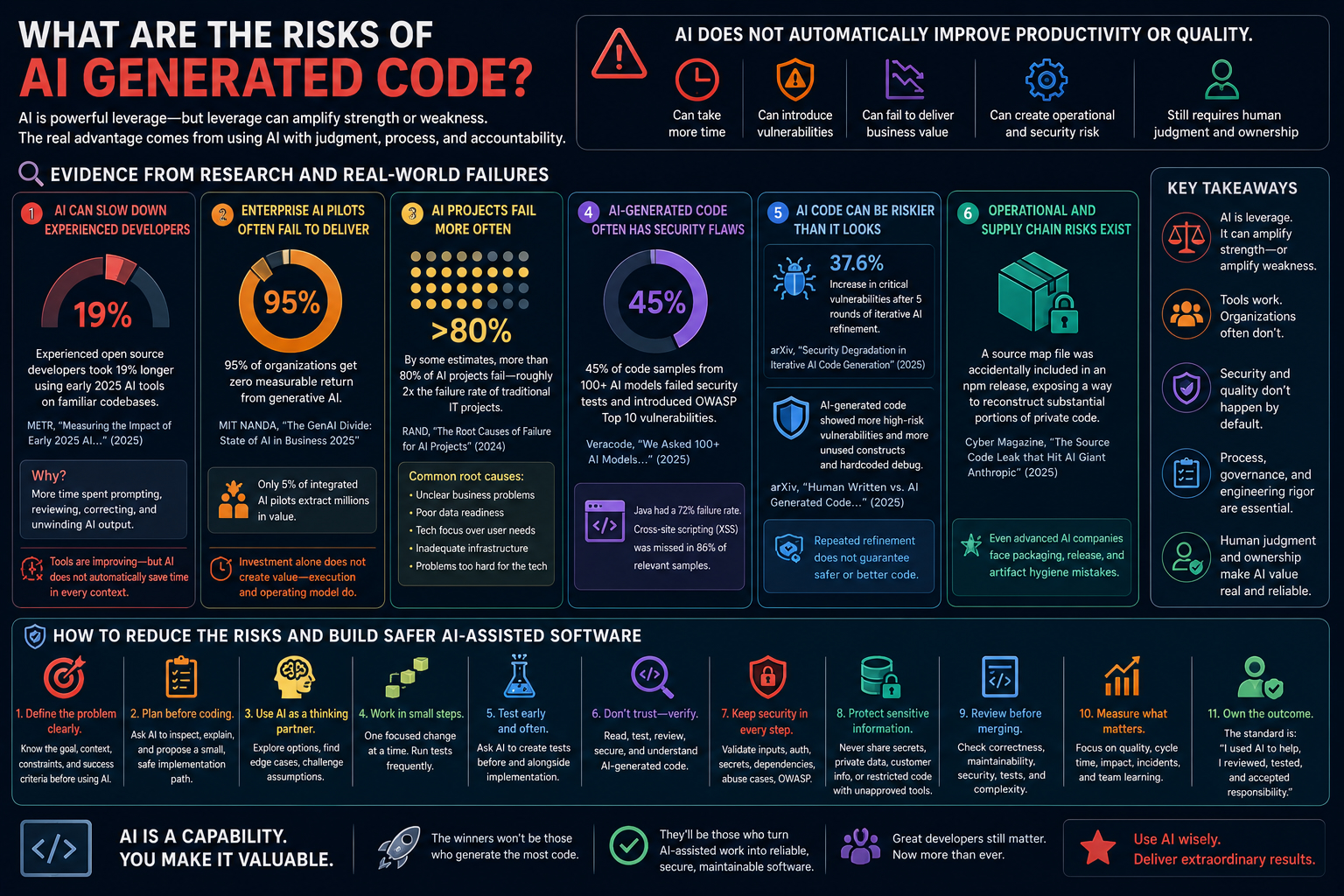
What Are the Risks of AI Generated Code?
A serious article about AI and software development should not only list success stories. There have also been failures. There have been stalled pilots, security concerns, productivity disappointments, and cases where AI made developers feel faster while traditional delivery metrics did not clearly improve. There have also been examples where AI generated code introduced defects, vulnerabilities, or operational risk.
That does not break the thesis of this article. It strengthens it. The real argument is not that AI automatically makes every developer or every company better. The argument is that AI is leverage, and leverage can amplify strength or weakness.
One of the clearest counterexamples comes from METR. In METR, “Measuring the Impact of Early 2025 AI on Experienced Open Source Developer Productivity“, METR studied experienced open source developers working on their own repositories. These were not beginners using toy examples. They were experienced developers working in familiar codebases. METR found that when developers used early 2025 AI tools, they took 19 percent longer than when they did not use them.
METR later noted that these results were historical and may no longer reflect the current impact of newer AI models. That caveat matters. Tools are improving quickly. But the lesson still stands: AI does not automatically improve productivity in every context. In complex, familiar, high context systems, an experienced developer may spend more time prompting, reviewing, correcting, and unwinding AI output than they would have spent solving the problem directly.
That is not failure of imagination. It is a reminder that software development is not just typing code. It is understanding context, making tradeoffs, knowing the system, knowing what not to change, recognizing subtle failure modes, and protecting maintainability.
There is also a broader enterprise failure pattern. MIT NANDA, “The GenAI Divide: State of AI in Business 2025“, found that despite 30 to 40 billion dollars in enterprise investment into generative AI, 95 percent of organizations in its dataset were getting zero measurable return. The report said only 5 percent of integrated AI pilots were extracting millions in value, while the vast majority remained stuck with no measurable profit and loss impact.
That report is not specifically about software development. It is about enterprise generative AI more broadly. But it is highly relevant for executives and engineering leaders because the failure pattern is familiar. The tools work, but the organization does not. A developer can save an hour and a team can still lose a quarter. A company can buy licenses and still fail to change its operating model. An executive can announce an AI strategy while the organization still lacks the workflows, data, governance, architecture, and accountability needed to turn AI usage into measurable business value.
RAND reached a similar conclusion from another angle. In RAND, “The Root Causes of Failure for Artificial Intelligence Projects and How They Can Succeed“, RAND noted that by some estimates, more than 80 percent of AI projects fail, roughly twice the failure rate of non AI information technology projects. RAND interviewed 65 experienced data scientists and engineers and identified recurring causes, including unclear or misunderstood business problems, poor data readiness, focus on technology instead of user problems, inadequate infrastructure, and applying AI to problems that are too difficult for the technology to solve.
Security is another area where the counterargument is serious. Veracode, “We Asked 100 Plus AI Models to Write Code. Here’s How Many Failed Security Tests“, tested more than 100 large language models across Java, Python, C sharp, and JavaScript. Veracode reported that 45 percent of generated code samples failed security tests and introduced OWASP Top 10 vulnerabilities. Java was the riskiest language in the test, with a 72 percent security failure rate across tasks. Veracode also reported that cross site scripting was one of the most frequent issues, with AI tools failing to defend against it in 86 percent of relevant code samples.
That does not mean developers should avoid AI. It means developers should avoid trusting AI generated code without security review. A 2025 paper, arXiv, “Human Written vs. AI Generated Code: A Large Scale Study of Defects, Vulnerabilities, and Complexity“, compared more than 500,000 Python and Java code samples authored by humans and by several large language models. The authors found that AI generated code was generally simpler and more repetitive, but also more prone to unused constructs and hardcoded debugging. The paper also found that AI generated code contained more high risk security vulnerabilities.
Another large scale analysis, arXiv, “Security Vulnerabilities in AI Generated Code: A Large Scale Analysis of Public GitHub Repositories“, examined 7,703 files explicitly attributed to AI tools. The authors found 4,241 Common Weakness Enumeration instances across 77 vulnerability types. A 2025 paper on iterative AI code generation, arXiv, “Security Degradation in Iterative AI Code Generation: A Systematic Analysis of the Paradox“, found a 37.6 percent increase in critical vulnerabilities after five rounds of iterative AI code refinement in its controlled experiment.
That finding challenges a common assumption: that repeatedly asking an AI model to improve code will naturally make it safer. The output may look cleaner, but the risk may be higher. This matters because many developers use AI exactly this way. They ask for code, then refinements, then cleanup, then another version. That can be useful, but without tests, security scanning, human review, and architectural judgment, repeated refinement can create a false sense of quality.
There have also been operational failures around AI development tooling itself. Cyber Magazine reported in Cyber Magazine, “Explained: The Source Code Leak that Hit AI Giant Anthropic“, that Claude Code drew attention after a source map file was unintentionally included in an npm package release, exposing a pathway to reconstruct substantial portions of the private TypeScript code behind the tool. Reporting on the incident said Anthropic described it as a release packaging issue caused by human error, not a malicious breach, and said no sensitive customer data or credentials were exposed.
That example is useful because it is not about a model hallucinating code. It is about the software supply chain around AI tools. It shows that even companies building advanced AI coding tools still face ordinary engineering risks: packaging mistakes, release process gaps, artifact hygiene, and operational controls.
The counterargument is real, but it does not lead to the conclusion that AI is bad for software developers. It leads to a more useful conclusion. AI is not a productivity strategy by itself. AI is not an engineering culture by itself. AI is not a software architecture by itself. AI is not a security program by itself. AI is not a product strategy by itself. AI is a capability. Whether that capability becomes value depends on how people use it.
The companies that win with AI will not be the companies that generate the most code. They will be the companies that convert AI assisted work into reliable, secure, maintainable, customer valuable software. That is the bar. And it is exactly why great developers still matter.

How Should Software Developers Use AI in Daily Work?
This is the heart of the matter. If you are a software developer, this is not a time to panic. It is a time to level up.
That sounds like a motivational line, but I mean it in a practical way. This is a time to become more capable, more valuable, more creative, more strategic, and more productive than you could have been at almost any previous point in the history of software development.
The opportunity is real, but it is not automatic. AI will not make every developer better. It will make prepared developers better. It will make curious developers faster. It will make disciplined developers more effective. It will make thoughtful developers more valuable. It will help developers who know how to use it, question it, test it, secure it, and turn its output into real software.
The wrong approach is to ask AI for code, paste the answer, and hope for the best. The right approach is to treat AI as a powerful collaborator that still needs direction, context, review, and accountability. The developer of the future is not someone who simply writes every line by hand. The developer of the future is someone who can understand a problem deeply, guide AI toward a solution, inspect the result, improve it, test it, secure it, and ship it responsibly.
That is a more powerful role. It is also a more demanding one. And honestly, that is why this moment is so interesting. Software development is not becoming less meaningful. It is becoming more leveraged.
Start With the Problem Before the Prompt
The first mistake developers make with AI is asking too quickly. They open a coding assistant and start typing before they have clarified the problem. That leads to vague prompts, vague answers, and generic code. Before asking AI to help, define the problem in plain language. Clarify what you are trying to build, who the user is, what success looks like, what constraints matter, what should not change, what edge cases are important, what existing patterns the codebase already uses, and what tests should pass.
This matters because AI tools are sensitive to context. GitHub, “Prompt Engineering for GitHub Copilot Chat“, recommends giving clear context and making the surrounding code readable, modular, tested, and well named so the assistant can produce better output. OpenAI, “Prompt Engineering“, also emphasizes clear instructions, reference material, breaking complex tasks into simpler steps, and giving the model time and structure to reason through the problem.
The practical habit is simple: do not ask AI to “build this feature” before you have explained the goal, the context, the constraints, and the acceptance criteria. A weak prompt says, “Build a login page.” A stronger prompt says, “I need to add a login page to this React application. It should follow the existing component patterns in the app. It should support email and password, show validation errors inline, call the existing auth API, redirect on success, and include tests for empty fields, invalid email, failed login, and successful login. Do not add a new styling library. Before writing code, summarize the implementation plan and ask what existing files you need to inspect.”
That is not just a better prompt. That is better engineering.
Use AI as a Thinking Partner Before Using It as a Code Generator
The highest leverage use of AI is often not asking it to write code immediately. It is asking it to help you think. Before implementation, ask AI to explain the current code, map the flow of data, identify the likely source of a bug, compare possible designs, list edge cases, challenge your assumptions, draft a test plan, summarize tradeoffs, identify security risks, find missing requirements, and review your approach before you code.
This is where AI can be incredibly valuable, especially when you are working in a large or unfamiliar codebase. Instead of jumping straight to implementation, use AI to accelerate understanding. Ask what a module appears to do, where state is being mutated, what risks exist if a function changes, what tests should exist before a refactor, and what parts of the code are most likely to break if the data model changes.
That kind of conversation can save hours. It can also help you become a better developer because you are not just accepting output. You are developing judgment. GitHub, “Best Practices for Using GitHub Copilot“, includes using Copilot to debug errors, analyze functionality, explore implementations, and generate code. That ordering matters. Analysis and exploration are just as important as code generation.
Break AI Assisted Work Into Small, Reviewable Steps
AI performs better when work is broken into focused tasks. Developers do too. Do not ask AI to rewrite an entire application in one pass. Do not ask it to refactor a large subsystem without checkpoints. Do not ask it to generate a major feature and then review a huge diff at the end. That is how errors hide.
Instead, break the work into small pieces. Ask for a plan first. Review the plan. Ask for one file or one function at a time. Run tests after each meaningful change. Ask for a diff summary. Ask for risks. Ask for missing tests. Ask for rollback considerations. Ask for follow up cleanup. This is especially important when using agentic coding tools that can modify multiple files. Agentic tools are powerful, but they need boundaries.
A good working pattern is to ask the AI to inspect the relevant files and summarize the current behavior, then propose an implementation plan, then identify risks and tests, then make the smallest useful change. After that, run the tests, review the diff yourself, ask it to explain the change back to you, and decide whether to continue. This is slower than blind generation, but it is much faster than debugging a large, confusing, AI generated mess.
The point is not to let AI run wild. The point is to create a tighter loop between intent, implementation, verification, and learning.
Treat AI Generated Code as Untrusted Until Proven Otherwise
This is one of the most important habits a developer can build. AI generated code should be treated like code from an enthusiastic junior developer who works very quickly, has read a lot, sometimes understands the problem, sometimes misses context, and sometimes sounds confident while being wrong.
That means the output deserves attention, not blind trust. Read the code. Run the tests. Add tests. Check error handling, security, performance, dependencies, logging, observability, maintainability, and fit with existing patterns. Check whether it introduces unnecessary abstraction. Check whether it solves the actual problem. This is not pessimism. This is professionalism.
The lesson is not “do not use AI.” The lesson is “do not skip engineering.” AI can help you write faster. Your job is to make sure the result is correct.
Make Tests Part of the Prompt, Not an Afterthought
One of the best ways to use AI is to ask for tests before or alongside code. This changes the workflow. Instead of asking AI to implement a feature and then hoping it works, ask AI to help define the behavior. Ask what should be tested, what edge cases matter, what would break the implementation, what regression tests should be added, what unit tests and integration tests should exist, what should be mocked, and what failure modes should be verified.
Then ask the AI to generate test cases. Inspect those tests carefully. Run them. Improve them. Then ask the AI to implement code that satisfies those tests. This is powerful because tests make the conversation more concrete. They turn vague intent into observable behavior, and they protect you from one of the biggest dangers of AI generated code: output that looks plausible but does not actually meet the requirement.
A strong AI assisted workflow often starts with a requirement, then acceptance criteria, then test cases, then implementation, then failure analysis, then refinement. This is where disciplined developers can become much faster without becoming sloppy. The goal is not more code. The goal is faster validated learning.
Use AI to Understand Legacy Code Before You Change It
Legacy code is one of the best use cases for AI. Many developers spend huge amounts of time trying to understand old systems with missing documentation, inconsistent patterns, unclear ownership, and years of accumulated decisions. AI can help summarize modules, explain dependencies, identify data flow, map old and new behavior, detect duplicated logic, propose safe refactoring steps, and generate characterization tests before behavior changes.
That last point is especially important. Before changing legacy code, ask AI to help you capture the current behavior in tests. Then refactor. Then use the tests to make sure the behavior did not accidentally change. That is how AI becomes a modernization tool instead of a risk multiplier.
The Amazon Q Developer Java modernization example is a strong proof point for this broader pattern. In Amazon Web Services, “Amazon Q Developer Just Reached a 260 Million Dollar Milestone“, AWS said Amazon used Q Developer to migrate tens of thousands of production applications from Java 8 or 11 to Java 17, saving more than 4,500 developer years of work and generating 260 million dollars in annual cost savings from performance improvements.
That does not mean every migration will produce those results. It does show that AI assisted modernization can be a serious enterprise capability when applied with the right tooling, controls, and review process.
Ask AI to Critique Its Own Work, Then Critique the Critique
AI can help you find problems in AI generated code, but do not stop there. Ask it what assumptions it made, what could be wrong, what edge cases it missed, what security risks exist, what performance risks exist, what parts of the implementation are most fragile, what a senior engineer would challenge in code review, what tests should be added, and what would make the code easier to maintain.
This can surface useful issues, but the critique is not proof. It is another input. You still need to inspect the code yourself. A helpful pattern is to use two passes. In the first pass, ask AI to generate or modify code. In the second pass, ask AI to act as a strict reviewer. Better yet, change the role and context. Ask it to review the code as a senior backend engineer responsible for reliability, as an application security engineer, as a staff engineer minimizing long term complexity, or as a product engineer looking for missing user edge cases.
You will often get different insights from each review. Then your job is to decide what matters. This is the essence of AI fluency: not just prompting, not just accepting, but directing, comparing, challenging, and deciding.
Keep Security in the AI Workflow From the Beginning
Security cannot be something you check after the AI has already generated a large body of code. It needs to be part of the workflow from the start. Tell AI what security rules matter. Ask it to avoid unsafe patterns, use parameterized queries, avoid hardcoded secrets, validate inputs, handle authorization explicitly, avoid logging sensitive data, check dependency risks, include abuse cases, and explain how the implementation could be attacked.
Then verify with tools. Use static analysis, dependency scanning, secret scanning, code review, threat modeling, secure coding checklists, and OWASP guidance. OWASP, “Top 10 for Large Language Model Applications“, and OWASP, “GenAI Security Project“, provide a useful framework for thinking about risks in LLM based systems, including prompt injection, insecure output handling, sensitive information disclosure, supply chain risk, and excessive agency.
Even if you are not building an LLM application yourself, the mindset applies. AI generated code can introduce risk. AI assisted tools can touch sensitive files. Agents can take actions. Generated dependencies can be wrong. Prompts can leak information. Outputs can look safe while being unsafe. Treat security as a normal part of AI assisted development, not as a separate cleanup phase.
Protect Company Code, Customer Data, and Secrets
Developers need to understand what they are allowed to share with AI tools. This is not optional. Before pasting code, logs, customer data, stack traces, database records, API keys, configuration files, or production errors into any AI system, understand your company’s policy. Know which tools are approved, whether prompts are retained, whether data can be used for training, whether the tool is approved for confidential code, whether customer data is allowed, whether regulated data is allowed, whether secrets are being filtered, and what happens when an agent runs commands locally.
This may sound boring, but it is part of being a professional developer in an AI assisted world. NIST, “AI Risk Management Framework“, emphasizes trustworthy AI through governance, measurement, management, and mapping of risk. That mindset applies directly to software teams using AI tools in development workflows.
Developers do not need to become policy experts. But they do need to know the rules of the environment they are working in. Using AI well includes using it safely.
Use AI to Learn Faster, Not to Avoid Learning
This may be the most important advice for junior and mid level developers. Do not let AI replace your learning. Use it to accelerate your learning. There is a huge difference.
A weak use of AI says, “Write this code for me.” A strong use of AI says, “Explain this concept to me. Show me three ways to solve this. Explain the tradeoffs. Show me the simplest version. Show me the production ready version. Explain every line. Quiz me on this code. Ask me what could go wrong. Help me prepare for a code review. Help me understand why this test failed.”
The developer who uses AI to avoid learning may become dependent. The developer who uses AI to learn faster can become dangerous in the best possible way. Every bug can become a lesson. Every error message can become a tutorial. Every unfamiliar codebase can become a guided tour. Every design decision can become a comparison.
That is an incredible gift, but only if you stay engaged. The goal is not to have AI think instead of you. The goal is to use AI to think better.
Build a Personal AI Playbook
Developers should not treat AI usage as random improvisation. Build a personal playbook. Keep prompts that work. Keep review checklists. Keep debugging workflows. Keep testing prompts. Keep refactoring prompts. Keep architecture review prompts. Keep security review prompts. Keep documentation prompts. Keep onboarding prompts.
Over time, you will discover what works for your codebase, your language, your team, and your style of work. This is how AI fluency compounds. A developer who casually uses AI once in a while may get occasional benefits. A developer who builds repeatable AI workflows can change their entire productivity curve.
Useful prompts include: “Explain this code as if I am new to this codebase, but not new to programming.” “Identify the smallest safe change to implement this requirement.” “Before writing code, list the files you need to inspect and why.” “Generate tests that capture the current behavior before refactoring.” “Review this diff for correctness, maintainability, security, and missing tests.” “Find edge cases that would break this implementation.” “Suggest a simpler design with fewer moving parts.” “Write a migration plan with rollback steps.” “Summarize this pull request for reviewers.”
A playbook like this turns AI from a novelty into a working system.
Learn Context Engineering for AI Assisted Software Development
Prompt engineering matters, but for developers, context engineering may matter even more. AI performs better when it has the right context: relevant files, clear requirements, existing patterns, test output, error messages, logs, architecture notes, API contracts, database schemas, constraints, examples of desired behavior, and examples of what not to do.
The art is not dumping everything into the model. The art is giving it the right information. Too little context leads to generic answers. Too much irrelevant context can confuse the model. Good developers will become good at selecting context. They will know what files matter, what tests matter, what business rule matters, what existing pattern should be followed, and what not to include.
In Visual Studio Code, “Best Practices for Using AI in VS Code“, Microsoft highlights practical AI workflow concepts like context, the agent loop, tools, and project configuration. That is where the craft is heading. The better you get at context, the better AI becomes.
Measure Outcomes, Not Lines of Code
This is a trap. AI can generate more code, but that does not always mean more value. More code can mean more bugs, more maintenance, more complexity, more review burden, and more surface area for security issues.
A better productivity question is whether the team solved the right problem faster. Did quality improve? Did cycle time improve? Did incidents decrease? Did developer flow improve? Did tests improve? Did maintainability improve? Did customers benefit? Did the team learn faster? Did the codebase get healthier?
This matters because some studies and company examples measure code generated, code accepted, code merged, or time spent coding. Those are useful signals, but they are not the whole story. The goal is not more typing. The goal is better software.
Keep Human Ownership Clear
AI can generate code, review code, explain code, test code, and suggest architecture. But AI does not own the outcome. You do. The developer owns the code they submit. The reviewer owns the review they approve. The team owns the system they operate. The organization owns the risk it accepts.
That clarity matters. If AI generated the code, you still need to understand it. If AI wrote the test, you still need to trust what it tests. If AI suggested the dependency, you still need to know why it belongs. If AI proposed the architecture, you still need to own the tradeoff. If AI modified production code, you still need to understand the blast radius.
The dangerous sentence is, “AI wrote it.” The professional sentence is, “I used AI to help, and I reviewed, tested, and accepted responsibility for the result.” That is the difference between AI assisted development and careless automation.
Use AI to Improve Communication, Not Just Code
Some of the best developer productivity gains are not in code generation. They are in communication. Use AI to help write design documents, pull request summaries, migration plans, release notes, test plans, bug reports, incident reviews, architecture decision records, onboarding guides, API documentation, customer impact summaries, executive summaries, and technical explanations for product partners.
This is underrated because many engineering problems are communication problems. Requirements are unclear. Tradeoffs are unclear. Ownership is unclear. System behavior is unclear. Decisions are unclear. Risks are unclear. AI can help turn messy technical thinking into clearer writing. That helps teams move faster. It also helps developers become more influential. A developer who can both build and explain becomes much more valuable.
Use AI to Reduce Toil and Increase Focus
Every developer has repetitive work that drains energy: writing boilerplate, updating tests, renaming patterns, creating fixtures, summarizing logs, formatting data, writing migration scripts, generating docs, cleaning up types, creating mock objects, converting examples, searching for repeated patterns, and drafting routine pull request descriptions.
These are excellent uses of AI. Do not waste your best thinking on work that AI can help automate. Save your attention for the parts that require judgment. This is one of the most exciting parts of being a developer now. AI can remove friction from the work around the work. It can help you stay in flow, get unstuck, and move through the tedious parts faster so you can spend more time on design, quality, user value, and craft.
That is not a small improvement. That can change how the job feels.
Use AI to Explore More Options Before Committing
One of the best things AI gives developers is optionality. Before AI, many developers chose the first reasonable solution because exploring alternatives took too long. Now you can ask for several options quickly. Ask for three implementation approaches. Ask the AI to compare tradeoffs, identify the simplest option, identify the safest option, identify the easiest option to test, identify the easiest option to roll back, and explain which option best fits the existing codebase.
This helps you avoid premature commitment. It helps you think more broadly. It helps you see paths you might not have considered. But again, AI does not decide. You decide. AI expands the option space. Engineering judgment narrows it. That combination is powerful.
Use AI to Prepare for Code Review
Code review is one of the best places to use AI. Before submitting a pull request, ask AI to review your diff for correctness, readability, maintainability, performance, security, missing tests, naming, unnecessary complexity, backward compatibility, migration safety, race conditions, error handling, and observability.
Then fix what makes sense. After that, ask AI to write a clear pull request summary that explains what changed, why it changed, how it was tested, what risks exist, and what reviewers should focus on. This helps reviewers, but it also helps you think. A good pull request summary is often a sign of good engineering discipline. If you cannot explain what changed and why, you may not be ready to submit it.
Learn When Not to Use AI as Autopilot
AI is powerful, but it is not always the right tool in the same way or at the same level of autonomy. Use caution when working on authentication, authorization, cryptography, payment flows, privacy sensitive workflows, regulated data, safety critical systems, high risk migrations, production incident response, unclear requirements, deep architectural decisions, subtle concurrency issues, and complex performance problems.
This does not mean AI cannot help. It means AI should be used as a support tool, not as an autopilot. Ask it to explain, identify risks, generate tests, and summarize options. But do not blindly accept implementation in high risk areas. In those areas, the cost of a plausible mistake is too high.
Build a Feedback Loop With Your Team
AI adoption should not be a private habit only. Teams should talk about what works. Create shared prompts. Share good workflows. Share bad failures. Share examples where AI helped. Share examples where AI made things worse. Create coding assistant guidelines. Agree on security expectations, review expectations, approved tools, what data can be shared, which areas require extra scrutiny, and how to measure impact.
This is where teams can turn individual productivity into organizational productivity. A single developer using AI well is helpful. A whole team learning together is transformative. This is also how you avoid the trap identified by enterprise AI failure research. RAND, “The Root Causes of Failure for Artificial Intelligence Projects and How They Can Succeed“, found that AI projects often fail because organizations misunderstand the business problem, lack proper data readiness, focus on technology over user need, lack adequate infrastructure, or apply AI to problems beyond the technology’s capability.
For developers, the lesson is clear. Do not make AI adoption a random side habit. Make it part of how the team learns and improves.
Build a Daily AI Workflow
The best way to improve is to make AI part of the daily development loop. At the start of a task, ask AI to help clarify the requirement, identify unknowns, and propose an implementation plan. Before coding, ask AI to identify relevant files, existing patterns, likely edge cases, and useful tests. While coding, use AI for focused help on small functions, test cases, refactoring, error messages, and documentation.
Before committing, ask AI to review the diff for correctness, simplicity, security, and missing tests. Before opening a pull request, ask AI to write a clear summary and reviewer guide. After review, ask AI to help understand feedback and improve the implementation. After shipping, ask AI to help update documentation, release notes, and lessons learned.
This is not complicated, but it is powerful. It turns AI into a constant companion across the software lifecycle, not just a code generator.
Keep the Joy of Building
There is one more point that matters. AI should make software development more joyful, not less. The best parts of being a developer are still here: solving hard problems, creating something from nothing, understanding a system, designing elegant abstractions, helping users, collaborating with teammates, turning an idea into a working product, and seeing something ship.
AI does not take that away. Used well, it removes some of the friction that gets in the way. It helps you move faster from idea to prototype, understand unfamiliar systems, learn new tools, clean up old code, test more thoroughly, communicate more clearly, and attempt work that used to feel too large, too tedious, or too expensive.
This is not the end of software development. It is a new chapter in the craft. The developers who thrive will not be the ones who deny the shift. They will be the ones who lean into it, learn the tools, build better habits, and raise their own standards.
This is the moment to become more than a coder. Become a developer who can direct AI, verify output, design systems, understand users, protect quality, and deliver value. That is a bigger job, a better job, and a more interesting job. For those willing to adapt, this may be the best time in history to be a software developer.

Practical AI Checklist for Software Developers
Use this checklist as a practical guide for daily AI assisted software development:
- Start with the problem, not the prompt. Clarify the goal, constraints, users, acceptance criteria, edge cases, and existing code patterns before asking AI to generate anything.
- Ask for a plan before asking for code. Use AI to inspect files, summarize current behavior, identify risks, and propose a small implementation path.
- Use AI as a thinking partner. Ask it to explain code, compare options, find edge cases, identify risks, and challenge assumptions before implementation begins.
- Break work into small steps. Avoid large unreviewable diffs. Ask for one focused change at a time and run tests frequently.
- Ask for tests early in the workflow. Use AI to propose unit tests, integration tests, regression tests, edge cases, and failure cases before or alongside implementation.
- Treat AI generated code as untrusted. Read it, test it, secure it, review it, and understand it before submitting it.
- Keep security in the loop. Ask for abuse cases, authorization checks, input validation, secret handling, dependency risks, and OWASP relevant issues.
- Protect confidential information before using AI tools. Do not paste secrets, private data, customer records, restricted logs, or confidential code into unapproved tools.
- Use AI to understand legacy systems. Ask it to summarize modules, trace flows, identify dependencies, and generate characterization tests before refactoring.
- Use AI to prepare for code review. Ask it to review your diff for correctness, maintainability, security, missing tests, and unnecessary complexity.
- Measure outcomes, not lines of code. Track quality, cycle time, customer impact, maintainability, incident rates, and team learning.
- Own the final result yourself. The professional standard is not “AI wrote it.” The standard is “I used AI to help, and I reviewed, tested, and accepted responsibility for the result.”
Frequently Asked Questions
Is AI going to replace software developers?
AI will change software development, but it is unlikely to eliminate the need for strong developers. AI can automate some coding tasks, generate boilerplate, help with debugging, and accelerate documentation, but developers are still needed for judgment, architecture, security, testing, product understanding, communication, and ownership. The role will evolve, and expectations will rise.
Can AI make software developers more productive?
Yes, AI can make software developers more productive, but the gains depend on context. Studies and enterprise examples show meaningful productivity improvements in code generation, documentation, refactoring, modernization, and prototyping. However, AI can also slow developers down when the codebase is complex, the context is poor, or the output requires heavy correction.
What are the biggest risks of AI generated code?
The biggest risks of AI generated code include defects, security vulnerabilities, weak tests, hallucinated APIs, poor context, unnecessary complexity, hidden technical debt, and overtrust. Developers should treat AI generated code as untrusted until it has been reviewed, tested, secured, and understood.
How should developers use AI in daily work?
Developers should use AI to clarify requirements, understand code, propose implementation plans, generate tests, explore design alternatives, review diffs, improve documentation, and reduce repetitive work. The best workflow is to use AI in small reviewable steps, verify everything, and keep human ownership clear.
Is now a good time to become a software developer?
Yes, now can be an excellent time to become a software developer for people willing to learn AI assisted workflows, strengthen fundamentals, and combine coding ability with product thinking, communication, security awareness, and system design. AI raises the bar, but it also gives motivated developers more leverage than ever before.
So Is This a Bad Time to Be a Software Developer?
No. It is only a bad time to be a software developer if you refuse to adapt.
If you see AI only as a foe, the future will look threatening. But if you see it as a tool, a collaborator, and a force multiplier, the future looks very different. This is a time to upskill, experiment, rethink old workflows, improve delivery, and raise the standard for what one person or one team can accomplish.
AI will raise the bar. But for those willing to learn, it will also raise the ceiling.
There has never been a more exciting time to build.
That same practical approach shaped the new online experience for Optima Optometry, bringing mobile access, patient resources, eyewear discovery, and appointment paths into a clearer website.
Source Notes
1. Microsoft Research and GitHub Copilot, “The Impact of AI on Developer Productivity: Evidence from GitHub Copilot“. The study found that developers using Copilot completed a coding task 55.8 percent faster than the control group.
2. McKinsey, “Unleashing Developer Productivity with Generative AI“. McKinsey found that developers could complete some software development tasks up to twice as fast with generative AI tools.
3. Stack Overflow, “Developer Survey 2025: AI“. The survey reported that 84 percent of respondents use or plan to use AI tools in development, and that 51 percent of professional developers use AI tools daily.
4. Anthropic, “When AI Builds Itself“. Anthropic says that more than 80 percent of code merged into Anthropic’s codebase was authored by Claude as of May 2026, and that the typical engineer was merging 8 times as much code per day in Q2 2026 as in 2024.
5. Anthropic, “Claude Fable 5 and Claude Mythos 5“. Anthropic reported that Stripe used Claude Fable 5 on a 50 million line Ruby codebase to perform a codebase wide migration in one day, work Anthropic said would otherwise have taken a whole team more than two months by hand.
6. Amazon Web Services, “Amazon Q Developer Just Reached a 260 Million Dollar Milestone“. AWS said Amazon used Amazon Q Developer to migrate tens of thousands of production applications from Java 8 or 11 to Java 17, saving more than 4,500 developer years of work and generating 260 million dollars in annual cost savings.
7. Google, “Google Cloud Next 2026: Sundar Pichai Remarks“. Google says 75 percent of all new code at Google is now AI generated and approved by engineers, up from 50 percent the previous fall.
8. Alphabet, “Alphabet Earnings Q3 2024 CEO Remarks“. Google previously said more than a quarter of all new code at Google was generated by AI, then reviewed and accepted by engineers.
9. Airbnb, “Airbnb Q1 2026 Financial Results“, and TechCrunch, “Airbnb Says AI Now Writes 60 Percent of Its New Code“. Airbnb said nearly 60 percent of the code its engineers produce is coauthored or written with AI.
10. TechCrunch, “Microsoft CEO Says Up to 30 Percent of the Company’s Code Was Written by AI“. Nadella said maybe 20 percent to 30 percent of code inside Microsoft repositories is written by software, meaning AI.
11. TechCrunch, “Spotify Says Its Best Developers Have Not Written a Line of Code Since December, Thanks to AI“, and Business Insider, “Spotify CEO Says Its Top Developers Have Not Written a Single Line of Code in 2026“. Spotify said some of its best developers were generating and supervising code rather than manually writing it.
12. 20VC, “Vlad Tenev“, Spotify, “Vlad Tenev 20VC Episode“, and Business Insider, “Robinhood CEO Says the Majority of the Company’s New Code Is Written by AI“. Robinhood said AI writes about 50 percent of net new code and that engineering team adoption is close to 100 percent.
13. Coinbase, “Tools for Developer Productivity at Coinbase“. Coinbase said it tracks the percentage of AI generated lines of code relative to human generated code and that AI generated code was on track to eclipse human generated code at Coinbase by the end of 2025.
14. Brian Armstrong, “AI Generated Code at Coinbase“. Coinbase CEO Brian Armstrong said about 40 percent of daily code written at Coinbase was AI generated and that he wanted it above 50 percent by October, while emphasizing review.
15. Uber, “Q1 2026 Prepared Remarks“. Uber said more than 10 percent of production ready code was driven autonomously by AI coding agents.
16. GitHub, “Mercado Libre Frees Developers’ Minds to Focus on Their Mission with GitHub“. GitHub reports that Mercado Libre has more than 9,000 developers using Copilot, saw a roughly 50 percent reduction in time spent writing code, and merges about 100,000 pull requests per day.
17. OpenAI, “Mercado Libre Introduces Verdi, an AI Developer Platform Powered by GPT 4o“. OpenAI describes Mercado Libre’s internal AI developer platform, Verdi, and says it drove productivity and efficiency gains while saving millions.
18. Microsoft, “GitHub Copilot Accelerates Coding at Saxo Bank“. Microsoft describes Saxo Bank’s use of Microsoft 365 Copilot and GitHub Copilot to boost efficiency and support an AI first culture.
19. Microsoft, “AI Powered Success with More Than 1000 Stories of Customer Transformation and Innovation“. Microsoft says Saxo Bank accelerated coding by around 30 percent, and says Bancolombia used GitHub Copilot to increase code generation by 30 percent, producing an average of 18,000 automated application changes per year and 42 productive daily deployments.
20. GitHub, “Quantifying GitHub Copilot’s Impact in the Enterprise with Accenture“. GitHub reported that Accenture developers accepted around 30 percent of Copilot suggestions, 90 percent committed Copilot suggested code, and 91 percent merged pull requests containing Copilot suggested code.
21. ZoomInfo Engineering, “Experience with GitHub Copilot for Developer Productivity at ZoomInfo“, and arXiv, “Experience with GitHub Copilot for Developer Productivity at ZoomInfo“. This study describes ZoomInfo’s Copilot rollout across more than 400 developers, reporting a 33 percent suggestion acceptance rate, 20 percent line acceptance rate, and 72 percent developer satisfaction score.
22. arXiv, “Developer Productivity With and Without GitHub Copilot: A Longitudinal Mixed Methods Case Study“. This study examined NAV IT in Norway across 703 GitHub repositories and 26,317 unique non merge commits, finding that commit based activity did not show statistically significant improvement after Copilot adoption, despite perceived productivity gains.
23. arXiv, “Beyond the Commit: Developer Perspectives on Productivity with AI Coding Assistants“. This study surveyed 2,989 developers and conducted 11 interviews at BNY Mellon, arguing that AI coding productivity should be measured across multiple dimensions, not only commits or lines of code.
24. Microsoft, “Dev Diaries: GitHub Copilot at Ramp: Fueling a 10x Developer Mindset“. Microsoft says Ramp uses GitHub Copilot and Azure AI to automate repetitive coding tasks and improve productivity, with one engineer saying Copilot boosts his productivity by at least 30 percent.
25. Salesforce Ben, “AI Can’t Replace Software Engineers Yet, Marc Benioff Says“. Marc Benioff said Salesforce engineering was probably 30 percent more productive because of AI, while cautioning that AI was not yet at the level where it replaces software engineers.
26. Tobi Lütke, “Reflexive AI Usage Memo“, First Round, “From Memo to Movement: Shopify’s Cultural Adoption of AI“, and The Verge, “Shopify CEO Says No New Hires Without Proof AI Cannot Do the Job“. Shopify made AI usage a baseline expectation and tied it to internal operating practices.
27. TechCrunch, “A Quarter of Startups in YC’s Current Cohort Have Codebases That Are Almost Entirely AI Generated“. TechCrunch reported that a quarter of YC’s Winter 2025 batch had 95 percent of their codebases generated by AI, based on comments by YC managing partner Jared Friedman.
28. U.S. Bureau of Labor Statistics, “Occupational Outlook Handbook: Software Developers, Quality Assurance Analysts, and Testers“. BLS projects 15 percent employment growth from 2024 to 2034.
29. DORA, “State of AI Assisted Software Development 2025“, and Google, “How Are Developers Using AI? Inside Our 2025 DORA Report“. DORA describes AI as an amplifier of organizational strengths and weaknesses.
30. METR, “Measuring the Impact of Early 2025 AI on Experienced Open Source Developer Productivity“. METR found that experienced developers working in familiar open source repositories took 19 percent longer when using early 2025 AI tools.
31. MIT NANDA, “The GenAI Divide: State of AI in Business 2025“. The report found that despite 30 to 40 billion dollars in enterprise generative AI investment, 95 percent of organizations in the dataset were getting zero measurable return.
32. RAND, “The Root Causes of Failure for Artificial Intelligence Projects and How They Can Succeed“. RAND identified recurring causes of AI project failure, including unclear business problems, poor data readiness, technology first thinking, inadequate infrastructure, and applying AI to problems beyond the technology’s capability.
33. Veracode, “We Asked 100 Plus AI Models to Write Code. Here’s How Many Failed Security Tests“. Veracode reported that 45 percent of AI generated code samples failed security tests and introduced OWASP Top 10 vulnerabilities.
34. arXiv, “Human Written vs. AI Generated Code: A Large Scale Study of Defects, Vulnerabilities, and Complexity“. The paper examines defect, vulnerability, and complexity differences between human written and AI generated code.
35. arXiv, “Security Vulnerabilities in AI Generated Code: A Large Scale Analysis of Public GitHub Repositories“. The paper examined 7,703 files explicitly attributed to AI tools and identified 4,241 Common Weakness Enumeration instances across 77 vulnerability types.
36. arXiv, “Security Degradation in Iterative AI Code Generation: A Systematic Analysis of the Paradox“. The paper found a 37.6 percent increase in critical vulnerabilities after five rounds of iterative AI code refinement in its controlled experiment.
37. Cyber Magazine, “Explained: The Source Code Leak that Hit AI Giant Anthropic“. The article reported that a Claude Code npm package release unintentionally included a source map file that allowed reconstruction of substantial portions of the private TypeScript code, which Anthropic reportedly described as a packaging issue caused by human error.
38. GitHub, “Best Practices for Using GitHub Copilot“. GitHub recommends understanding Copilot’s strengths and weaknesses, choosing the right tool for the job, creating thoughtful prompts, checking Copilot’s work, and guiding it toward helpful outputs.
39. GitHub, “Prompt Engineering for GitHub Copilot Chat“. GitHub recommends giving clear context and following good coding practices, including consistent style, descriptive names, modular code, comments, and unit tests.
40. OpenAI, “Prompt Engineering“. OpenAI describes prompt engineering as the process of writing effective instructions so a model more consistently generates content that meets requirements.
41. Visual Studio Code, “Best Practices for Using AI in VS Code“. Microsoft provides practical guidance for using AI coding workflows in VS Code, including concepts such as context, the agent loop, tools, and project configuration.
42. OWASP, “Top 10 for Large Language Model Applications“, and OWASP, “GenAI Security Project“. OWASP provides security guidance for LLM based applications and generative AI systems, including risks such as prompt injection, insecure output handling, sensitive information disclosure, supply chain vulnerabilities, and excessive agency.
43. NIST, “AI Risk Management Framework“. NIST developed the AI Risk Management Framework to help organizations manage AI related risks and improve trustworthy AI practices.
© Copyright Paul Tocatlian. All Rights Reserved.
You must be logged in to post a comment.